Welcome to your 2025 Computer First Term Examination Practical For SSS2
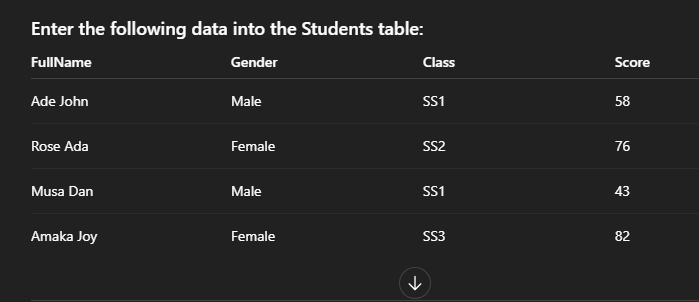
Create a new Microsoft Access database and name it: STUDENT_DB_YOURNAME.accdb TASK 1 — Create a Table (Already Provided Data) Create a table named Students with the following fields: Field Name Data Type StudentID AutoNumber (Primary Key), FullName Short Text, Gender Short Text, Class Short Text, Score Number. TASK 2 — CREATE A FORM Create a form named StudentForm based on the Students table with the following requirements: The form must display all fields of the Students table. Add a title at the top of the form: “STUDENT INFORMATION ENTRY FORM” Add any theme or layout of your choice. Save the form as StudentForm. Use the form to enter the data below TASK 3 — CREATE A REPORT Create a report named ScoreReport based on the Students table with the following requirements: The report must show: FullName Gender Class Score Group the report by Class. Sort students alphabetically by FullName. Add a report title at the top: “STUDENT SCORE REPORT” Apply any report style of your choice. Save the report as ScoreReport. upload the database file and submit
Drag and Drop File Here or
Browse
