Welcome to your 2025 Computer First Term Examination Practical For SSS1
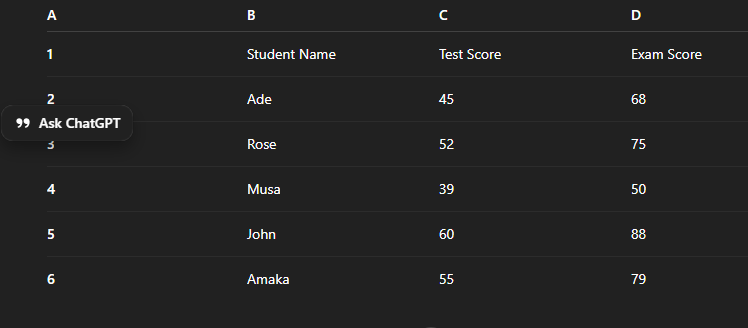
INSTRUCTION: Create a worksheet for “Student Score Analysis” using Microsoft Excel. Save the file as SCORE_ANALYSIS_YOURNAME.xlsx DATA ENTRY Enter the following data starting from Cell A1: A B C D 1 Student Name Test Score Exam Score 2 Ade 45 68 3 Rose 52 75 4 Musa 39 50 5 John 60 88 6 Amaka 55 79 TASKS 1. Total Score Insert the heading "Total Score". Use a formula to calculate: Total Score = Test Score + Exam Score Apply this to all students. 2. Grade In Column F, insert the heading "Grade". Use a formula =IF(E2>=70,"A",IF(E2>=60,"B",IF(E2>=50,"C",IF(E2>=40,"D","F")))) for Total Score: Score Range Grade 70 – 100 A, 60 – 69 B, 50 – 59 C, 40 – 49 D, 0 – 39 F, Apply the formula to all rows. 3. Pass/Fail Status In Column G, create a heading "Status". Use a formula: =IF(E2>=50,"PASS","FAIL") 4. Highest and Lowest Score Below the table (e.g., cell B9 & B10), calculate: Highest Total Score Lowest Total Score Use MAX and MIN functions. 5. Average Score In Cell B11, compute the Average Total Score using AVERAGE function. 6. Chart Creation Create a Column Chart that displays Student Names against their Total Scores. Apply: Chart Title: "Total Score Comparison" Data labels on top of each bar 7. Formatting Apply the following: Make the header row bold Apply borders around all data. 8. Footer Insert a footer showing: Your Name on the left. upload the file and submit.
Drag and Drop File Here or
Browse
